
 Cyotek WebCopy
Copy websites locally for offline browsing
Cyotek WebCopy
Copy websites locally for offline browsing
Cyotek WebCopy is a free tool for automatically downloading the content of a website onto your local device.
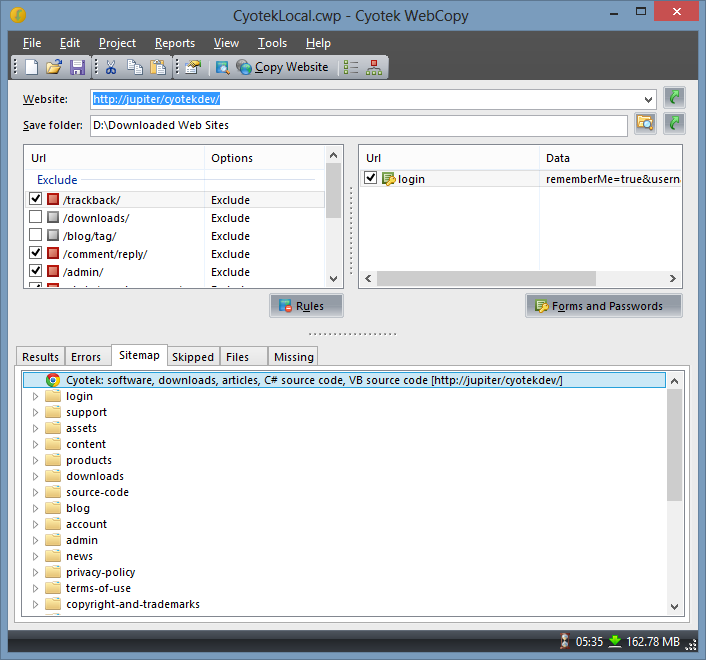
WebCopy will scan the specified website and download its content. Links to resources such as style-sheets, images, and other pages in the website will automatically be remapped to match the local path. Using its extensive configuration you can define which parts of a website will be copied and how, for example you could make a complete copy of a static website for offline browsing, or download all images or other resources.
What can WebCopy do?
WebCopy will examine the HTML mark-up of a website and attempt to discover all linked resources such as other pages, images, videos, file downloads - anything and everything. It will download all of theses resources, and continue to search for more. In this manner, WebCopy can "crawl" an entire website and download everything it sees in an effort to create a reasonable facsimile of the source website.
What can WebCopy not do?
WebCopy does not include a virtual DOM or any form of JavaScript parsing. If a website makes heavy use of JavaScript to operate, it is unlikely WebCopy will be able to make a true copy if it is unable to discover all of the website due to JavaScript being used to dynamically generate links.
WebCopy does not download the raw source code of a web site, it can only download what the HTTP server returns. While it will do its best to create an offline copy of a website, advanced data driven websites may not work as expected once they have been copied.
Minimum Requirements
- Windows 10, 8.1, 8, 7, Vista SP2
- Microsoft .NET Framework 4.6
- 20MB of available hard disk space
Donate
This software may be used free of charge, but as with all free software there are costs involved to develop and maintain.
If this site or its services have saved you time, please consider a donation to help with running costs and timely updates.
Donate